Finish the navigation links and add the enlarging picture.
Open your jokes page in Dreamweaver, then:
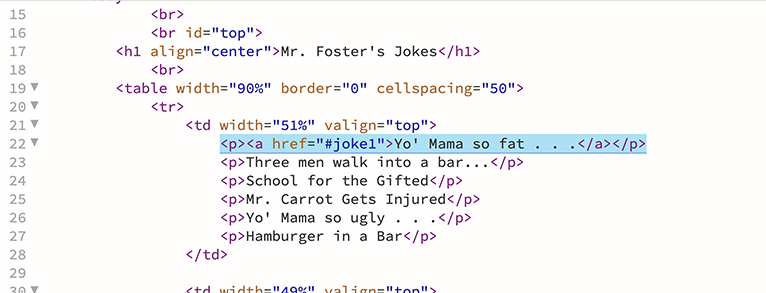
1. Finish setting up the links to the jokes on the left side.
Make the next five lines look like the highlighted line, but change the joke numbers (second one is #joke2, third one is #joke3, etc.):
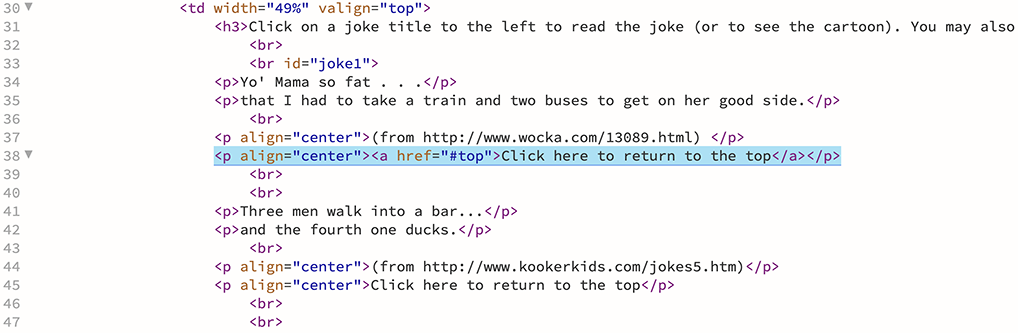
2. Make all of the "click to return to the top" links in the page look like the highlighted one below:
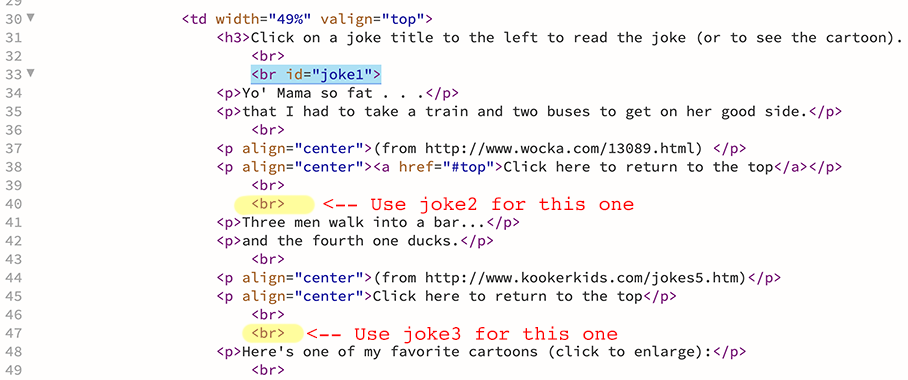
3. Make all of the <br> tags just above the jokes look like the one in blue, but change the numbers depending on which joke it is.
Use joke2 for the second one, joke3 for the third one, etc. (only the next two are highlighted in yellow):
4. Add code around your small picture to make it a link to your big picture.
Change your code (looks like the first picture now) to make it look like the second picture. Change the image names to yours, obviously.


5. Save your page.
Open it in a browser. Everything work okay? Fix it if not.